Daruma AI Business Hub

AI for your back office, in your own cloud, on your own data.

An AI-first platform for running the back office, for companies that bid for work, run jobs, and pay a lot of vendors. It runs in your own Microsoft Azure subscription, connects the systems you already have, and lets AI work across all of it, within each person's permissions.

Version 1 launches by February 1, 2027. The core will be free and open source.

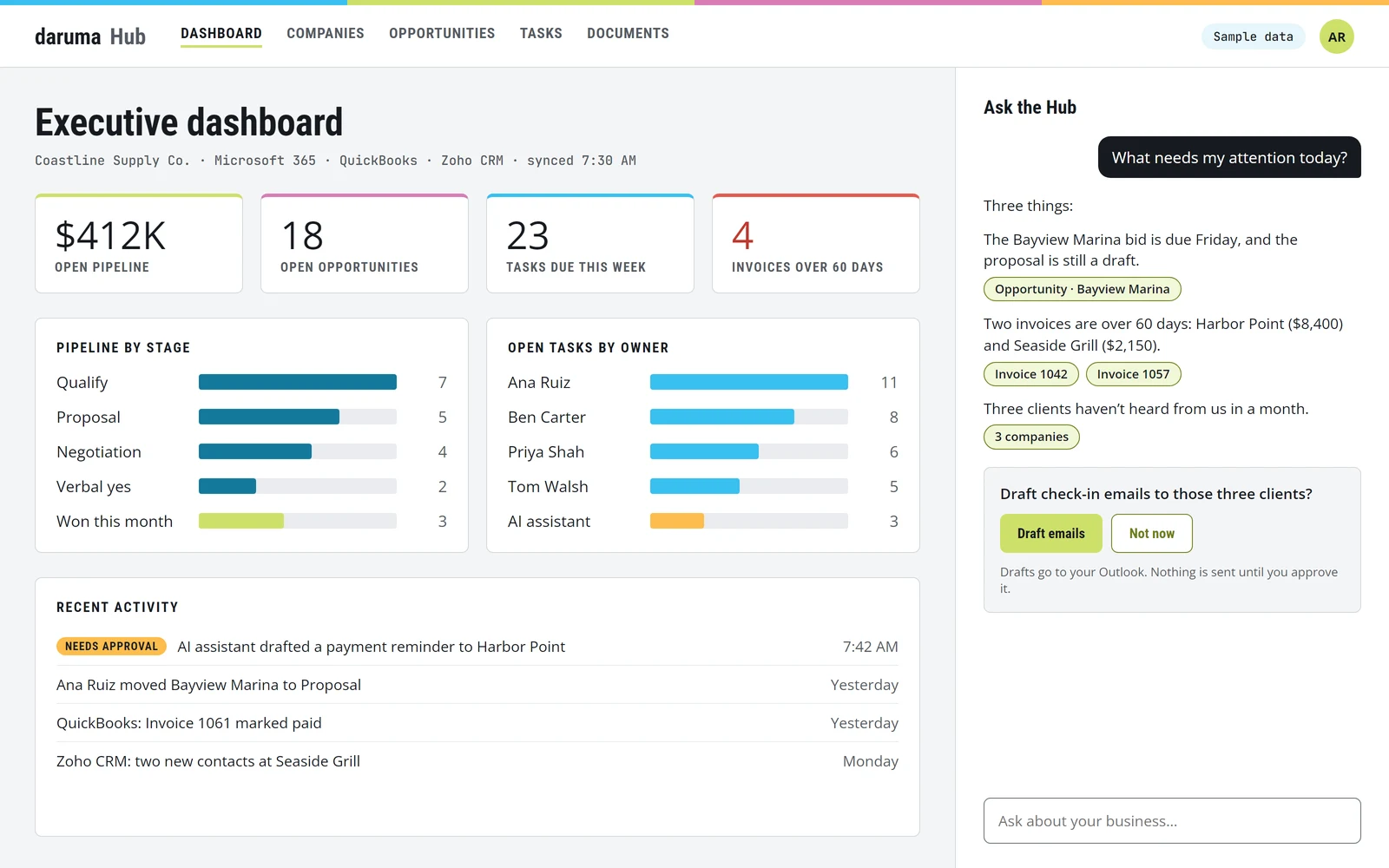
Daruma Hub with sample data: an executive dashboard of pipeline, tasks and overdue invoices, and the Ask the Hub panel answering “What needs my attention today?” with links to the opportunity and invoices, and offering to draft check-in emails that wait for approval

Why a business hub

Most businesses already have the data. It just lives in too many places.

Customer records sit in a CRM. Jobs and vendors live in the accounting system. Bids arrive by email. Reports are rebuilt in spreadsheets every month. AI makes the gap more costly: an assistant can only help with information it can reach.

Scattered records
The same customer or vendor is entered and kept up to date in several systems.
Manual handoffs
Staff retype invoices, copy bid details, and chase status updates by hand.
AI without context
General AI tools can't see the business data they would need to be useful.

In one minute

How the Hub fits together.

Your module
The core · Daruma AI Business Hub
Authentication & Security
One sign-in, permissions and an audit log
Data Storage
One shared database, in your own Azure
Basic CRM
Customers, contacts, jobs and opportunities
Integrations
Office 365, QuickBooks, CRMs and more
Workflow
Documents, scheduled tasks and approvals
AI
The AI Assistant, and the AI Connector for your preferred AI
Your module
Built on the same core
RFP Radar
Finds and scores bids
Sales & Marketing
Campaigns, call queue, pipeline
Service & Billing
Work and invoicing on the same records
AP Automation
Proposals & Estimating
Projects
Client Portal
BI Dashboards
Website Assistant
Running our business today
On the way
Talk to Us About the Hub
Read the animation as text
  1. 01 · The problemMost businesses already have the data. It just lives in too many places.A CRM, the accounting system, inboxes and spreadsheets that don't talk to each other.
  2. 02 · The coreDaruma AI Business Hub starts with the core already built.Authentication and security, data storage, basic CRM, integrations, documents and workflow, the AI Assistant, and the AI Connector for your preferred AI. In your own Azure, on your own data. The core will be free and open source.
  3. 03 · ModulesEach module does one job, on the same core and the same data.RFP Radar, Sales & Marketing, and Service & Billing already run our own business, and they move onto the Hub first.
  4. 04 · On the wayMore modules are coming. Add only the ones you need.AP Automation, Proposals & Estimating, Projects, BI Dashboards, and a free Website Assistant that answers your visitors and books calls.
  5. 05 · Shared, not copiedOne sign-in. One set of records. One AI assistant, across every module.AI suggests. People approve.
  6. 06 · Your moduleNeed something else? Build your own module.Your developers, an AI coding agent or our team build it on the same core, and it keeps working through upgrades.

The approach

Connect what you have, add what you need, and let AI work across all of it.

Your existing systems connect through their APIs or MCP servers, so their records meet in one shared database inside your own Azure subscription. Modules plug into the same core, and AI sees the whole picture, within each person's permissions.

Your Microsoft Azure subscriptionYour data stays here

The coreFree and open source

  • Authentication & SecurityOne sign-in, roles and permissions, and an audit log
  • Data StorageThe Business Data Hub: one shared database for every module
  • Basic CRMYour customers, contacts, jobs and opportunities, in one place
  • Documents & WorkflowFiles on their records; scheduled tasks and approvals
  • AI AssistantAnswers questions and does work across your data
  • AI ConnectorLets your preferred AI work with your Hub data, under your permissions

ModulesAdd the ones you need, on the same core

  • RFP Radar
  • Sales & Marketing
  • AP Automation
  • Service & Billing
  • Proposals & Estimating
  • Website Assistant
  • Projects
  • Client Portal
  • BI Dashboards

Your systemsOffice 365 · RFPMart · QuickBooks · Dynamics CRM · Zoho CRM · Jonas Premier · and more, through integrations

Your preferred AIClaude, ChatGPT or another assistant, through the AI Connector. The AI Assistant uses your own Anthropic or Azure AI account.

The core comes first: sign-in and security, data storage, basic CRM, and AI. Modules run on top of it, inside your Azure subscription. Your systems connect in through integrations, and your preferred AI connects through the AI Connector, signed in as you, with your permissions.
Connect what you have
Accounting, CRM, and email stay in place. The Hub works alongside them, not instead of them.
Add what you need
New modules use the data already in the Hub. No new migration, no new system.
One place for everything
One sign-in, one set of records, and AI that can see all of it.

The core

Everything a business needs before it puts AI to work.

The core is the foundation every module runs on. It keeps your customers, people, jobs, and documents in one place, inside your own Azure subscription, and gives AI safe, controlled access to them. The Community Edition is free, and the core will be open source.

01

Authentication and security

One sign-in for every module. Roles and permissions decide what each person can see and do, and AI working for them gets exactly the same access. Admins manage users and settings, and see a record of every change and every AI action.

02

Data storage

The Business Data Hub: one shared database in your own Azure subscription, used by every module and every connected system. Your data stays there, and it stays yours.

03

Basic CRM

Basic customer relationship management: companies, people, jobs or projects, and opportunities, and how they connect: who works where, which jobs belong to which customer. Every record has notes, a timeline, and your own custom fields.

04

Import and integrations

Bring in spreadsheets and exports from your current systems, with a preview and duplicate checks. Records remember where they came from, so a re-import updates instead of duplicating.

05

Documents and media

Files and images attached to the records they belong to, stored in your own cloud, and readable by AI.

06

Automation and workflow

Scheduled tasks and notifications, built once and used by every module. Review and approval steps are coming soon.

07

AI Assistant

Answers questions and does work across your business data, using your own Anthropic or Azure AI account.

08

AI Connector

Lets your preferred AI assistant, such as Claude or ChatGPT, work with your Hub data, signed in as you and limited to what you're allowed to see. It's built on the Model Context Protocol (MCP), the open standard for connecting AI to business systems.

09

Feedback

Report a problem from any screen. Data problems go to your own team; bugs and ideas come to us, so the product keeps improving. Coming soon.

Your data stays yours. It lives in your own Azure subscription, in your own database, and you keep it if you leave.

AI you can trust

AI suggests. People approve.

The data model, permissions, and module interfaces were designed so AI reads and acts on business information through the same controlled paths people use.

Modules

Business applications that share one hub.

Each module installs on the core and works with the same data, permissions, and AI. Basic CRM and the AI Assistant are already part of the core. Start with one module and add others as you need them.

BidsAvailable at launch

RFP Radar

Discovery, evaluation, and tracking of bid opportunities from email and procurement websites.

  • Monitors a designated RFP mailbox
  • Watches compatible procurement websites for new bids
  • AI relevance scoring, summaries, and duplicate detection

SalesComing next

Sales & Marketing

The enhanced CRM: prospecting, campaigns, call queue, and pipeline, on top of the core's basic CRM.

  • Outbound prospecting and campaigns
  • Call queue for your sales team
  • Pipeline and account enrichment

FinanceComing next

AP Automation

Invoice intake, AI extraction, review, and approval before transfer to your accounting system.

  • Invoices by email or secure vendor upload
  • AI extraction of vendor, amounts, jobs, and cost codes
  • Review and approval with duplicate checks

ServiceComing next

Service & Billing

Service agreements, work, and invoicing on the same customer and job records.

  • Service and support cases tracked by customer and job
  • Billing from the work recorded, without retyping
  • Invoices sent to your accounting system

SalesComing next

Proposals & Estimating

Build a priced proposal from your own catalog, send it as a private link, and see the moment your client opens it.

  • Your brand, your packages, options, and rates
  • Clients comment, accept, or request changes in one place
  • Prices locked when sent

Website · FreeComing next

Website Assistant

Answers visitors' questions on your website from your own published pages, and books discovery calls with your sales team. Turn it on in admin and paste one line into your site.

  • Answers from your public pages, with links to the source
  • Offers a call and opens the right salesperson's booking page
  • Passes support requests from existing clients to your support team

OperationsComing next

Projects

Jobs, tasks, and milestones connected to customers, vendors, and invoices.

CustomersComing next

Client Portal

A secure place for your customers to see their jobs, documents, and invoices.

ReportingComing next

BI Dashboards

Basic dashboards are in the core. This module adds fuller reporting drawn directly from the shared database.

Where it fits best

Specialty contractors and construction services
Bid-heavy, job-costed, and buried in vendor invoices: RFP Radar, AP Automation, jobs, and Jonas all apply.
Engineering, architecture, and surveying firms
Living on proposals and RFPs, with project files everywhere. Usually already on Microsoft 365.
IT services and MSPs
Service & Billing, Datto, and Acronis. An MSP can also install and run the Hub for its own clients.
Government contractors and firms bidding public work
RFP Radar is a direct fit, and the data stays in their own tenant.
Wholesale distribution
Heavy on accounts payable and purchase orders, with many vendors and quotes.
Property and facilities management
Vendors, work orders, invoices, and owner reporting: AP plus jobs plus the client portal.

Integrations

Works with your systems.

Every modern system has an API or an MCP server. Connect them to the Hub, and it becomes the central place for everything: records flow in from each system, your team and AI work across all of them, and approved work flows back out. Anything else with an API or MCP server can be connected as a custom integration.

Microsoft and cloud
SystemForStatus
Office 365Email, calendar, sign-inAvailable at launch
Microsoft AzureWhere the Hub runsAvailable at launch
SharePointDocuments and filesComing next
Amazon Web ServicesData and services in AWSRoadmap
Google CloudData and services in Google CloudRoadmap
Accounting and time
SystemForStatus
Jonas PremierConstruction accounting and ERPIn development
QuickBooksAccountingComing next
HarvestTime trackingComing next
CRM and business data
SystemForStatus
Microsoft Dynamics CRMCRMComing next
Zoho CRMCRMComing next
BlueDog DataResidential AV and specialty contractor price and cost dataComing next
Bids, phone, and mail
SystemForStatus
RFPMartBid sources, for RFP RadarAvailable at launch
AircallPhoneComing next
PostGridDirect mailComing next
IT services
SystemForStatus
DattoIT backup and devicesComing next
AcronisIT backup and securityComing next

“Coming next” integrations are already proven in production in our own systems and move to the Hub with their modules.

Editions

Start free. Add what you need.

Every edition includes the full core: basic CRM, the AI Assistant, and the same security. One company, unlimited users.

Community Edition and Professional Edition
FeatureCommunity Edition: freeProfessional Edition: ask us
What it isCommunity: The full core, free for any company. Your development team or an AI coding agent can build on it through the module API.Professional: The same core, run for you.
InstallCommunity: Yourself, or a guided install with us as a paid serviceProfessional: Included
UpgradesCommunity: You apply them; fixes for your version are freeProfessional: Applied for you
SupportCommunity: Per issue, or a support planProfessional: Included, with response times
Monitoring and backupsCommunity: Your responsibilityProfessional: Included

Modules and integrations are priced separately, with early-adopter pricing: ask us. The Website Assistant module is free. Source code for commercial modules is available under a separate licence.

Azure hosting and AI usage are billed to you directly by Microsoft and your AI provider. Each licence is for one company and includes bug and security fixes for that major version. Licences for several companies: ask us.

From first conversation to working system

  1. AssessA free systems assessment: your systems, your data sources, and the processes that take the most manual effort.
  2. Deploy the coreInstalled in your Azure subscription, with your essential records brought into the Business Data Hub. We run it, or hand it to your IT team.
  3. Add your first modulesConfigured for your highest-priority needs and tested with your team.
  4. Train and expandYour staff learn to run it day to day. More modules go on the same platform when you're ready.

Live in weeks, not months: typically two to four weeks from access to your data. Every project starts with a free assessment, so you get a fixed quote before any work starts.

Who builds it

Built and supported by a certified team.

Daruma Tech is certified to ISO/IEC 27001 for information security and ISO/IEC 20000-1 for service management, and the Hub is built and supported under those practices. Your install runs in your own Azure subscription, under your account and your security policies.

Read our trust center

Questions

Daruma AI Business Hub questions we hear most.

Is the Daruma AI Business Hub open source?

The core will be released as open source under the Apache 2.0 licence, so you can install it, read the code, and build on it. Commercial modules such as RFP Radar and AP Automation are licensed separately, and their source code is available under a separate licence.

When is it available?

Version 1 launches by February 1, 2027. If you'd like to be one of the first companies running it, talk to us now.

Do we need our own IT staff?

No. We can install and run it for you. If you have IT staff or an IT partner, they can take it over once it's running.

Does it replace our accounting system?

No. It works alongside your accounting system and sends approved records to it.

What happens to our data if we stop?

It stays in your own Azure subscription, in your own database. It is yours.

How long does a first deployment take?

Once we have access to your Azure subscription and your data sources, most companies are working in the Hub within two to four weeks. More integrations or messier data take longer, and we'll tell you up front.

What does it cost to run?

The Hub runs in your own Azure account, so you pay Microsoft directly: typically $100 to $300 a month for the core and everyday modules. Data-heavy modules such as RFP Radar add to that. AI usage is pay-as-you-go on your own AI account. We'll estimate your running costs, module by module, before you start.

Is my data used to train AI?

No. We never use your data to train AI, and client data is never pooled across clients. The Hub reaches AI through your company's own business account with Anthropic or Microsoft Azure AI, whose commercial terms don't use your data to train their models.

Which cloud does it run on?

Version 1 runs in your own Microsoft Azure subscription. Other cloud providers are on the roadmap; ask us if you need one.

Tell us which part of your back office you'd hand to AI first.

An AI idea, a network that needs looking after, or a website that needs a new home. You'll hear back from a named person within one business day. If we're not the right firm, we'll say so and tell you who might be.

Susan Erickson, Co-Founder & Vice President · Rob Kennedy, Co-Founder & Chief Executive Officer · (561) 206-6290

The work was always excellent, very creative, delivered on-time, on budget and always exceeded expectations.
Joe Cytacki · Museum of Discovery & Science, Fort Lauderdale